

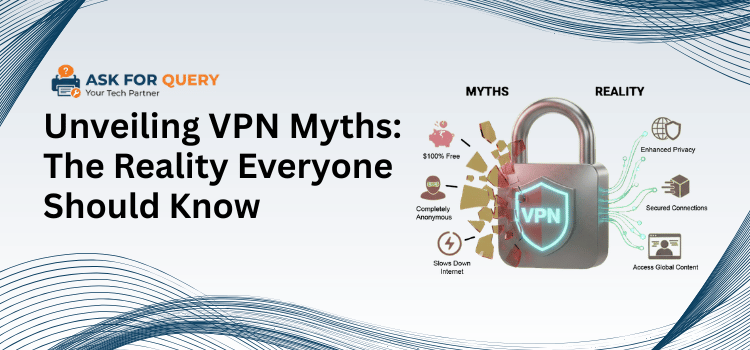
When you want to hide your identity online, what’s the first thing you do? Open a VPN, right? Most of us do. Because somewhere along the way, we started believing that turning on a VPN makes us completely anonymous, invisible, untraceable, and fully protected. But here’s the uncomfortable truth: a VPN doesn’t make you anonymous. It hides your IP address, encrypts your internet traffic, and prevents your ISP from seeing what websites you visit, and that’s pretty much it.
It doesn’t hide you when you log into your social media accounts, it doesn’t stop websites from tracking you, and it certainly doesn’t erase your digital footprint. In simple terms, using a VPN for anonymity is like wearing a mask while still shouting your real name in a crowded room. Sounds shocking? That’s because we’ve been living with half-truths.
There are many VPN myths people accept as reality, but the truth is deeper and far more interesting than what most advertisements suggest. This guide is your reality check, breaking down what VPNs actually do and exposing the myths we’ve been trusting for far too long.
10 Common VPN Myths: You Should Stop Believing
Myths propagate quickly, particularly in the digital world. When it comes to VPNs, many individuals accept claims without questioning them. But not anymore. This section debunks ten popular VPN fallacies, separating fact from fiction, allowing you to make informed decisions and protect yourself and people around you from false assumptions.
1. A VPN Will Also Protect You from Viruses, Right?
This is a major misconception. A VPN and malware protection are entirely separate things. A VPN simply masks your IP address and encrypts your internet connection. It doesn’t scan files, detect viruses, or prevent malicious downloads. If you open a malicious link or visit a compromised website, the VPN will not protect you. Malware protection requires antivirus software and good browsing habits. A VPN isn’t going to protect you from viruses.
2. Free VPNs Work Like Paid VPNs
It sounds nice; why pay when you can get it for free? But here is the truth. There are trustworthy free VPNs available, but they typically have server, speed, or bandwidth limitations. That is the best-case scenario. In the worst-case scenario, some free VPNs monitor your behavior, introduce advertisements, or even sell your information to third parties. Remember that if you don’t pay for a thing, you can become the product. Paid VPNs often have stricter privacy regulations and more secure features.
3. VPNs Are Only for Tech Geniuses
VPNs were once considered exclusive to tech experts. Today? Not at all. Modern VPN programs are intended for daily users. You download the app, push a single button, and you are connected. That’s it. You do not need to understand encryption standards or networking. This tool is no longer limited to hackers and IT specialists. Students, remote workers, travelers, and everyday folks all use VPNs on a daily basis. The concept that VPNs are complex is out of date. Technology has evolved, and so has user-friendliness.
4. Using a VPN is illegal
Let us resolve this misconception gently. In most countries, utilizing a VPN is perfectly legal. Businesses use them. Remote workers use them. Even schools utilize them. However, several nations limit VPN use or only allow government-approved services. So legality varies by location. However, in the vast majority of areas, simply utilizing a VPN is not illegal. What is really important is how you use it. A VPN doesn’t make illegal actions legal; it’s just a tool.
5. VPNs Always Kill Your Internet Speed
Yes, a VPN can degrade performance by encrypting your data and routing it through another server. However, “always slow” is an exaggeration. High-quality VPNs are optimized to minimize speed loss. In some circumstances, they can even enhance your browsing experience by avoiding ISP throttling. So, while you may occasionally notice a little decline, it is usually not significant. The speed of your VPN connection is determined by the provider, the server location, and your primary internet connection.
6. All VPN Services are Basically the Same
This is equivalent to stating all cars are the same because they have four wheels. VPNs differ in terms of encryption protocols, logging rules, server networks, speed performance, and more features. Some keep no logs. Some do. Some have extensive security features, such as kill switches and multi-hop connections. Others do not. Choosing a VPN (Virtual Private Network) without considering these distinctions may puzzle your privacy. Not all VPNs are created the same way, and this distinction is significant.
7. Once the VPN is on, You’re Completely Secure
Turning on a VPN is not the same as enabling full protection. It’s only one layer of security. True online safety necessitates strong passwords, two-factor authentication, up-to-date software, and cautious online activity. If you use weak passwords or click on dubious links, a VPN will not instantly fix everything. Consider it one shield, useful but not complete armor. Digital security consists of both tools and wise behaviors.
8. A VPN Prevents Any Online Tracking
Not precisely. While a VPN covers your IP address, websites continue to use cookies, browser fingerprinting, and tracking software. If you log in to your accounts, organizations can still track your activities on their sites. A VPN decreases visibility, but it does not eliminate your digital footprint. Tracker blockers, private browsing settings, and cautious usage are all required for increased privacy. A VPN is useful, but not a complete anti-tracking solution.
9. You Only Need a VPN on Public Wi-Fi
Yes, there is a risk with public Wi-Fi. However, tracking, data collecting, and surveillance do not occur exclusively in coffee shops or airports. Your ISP can still monitor your surfing activities at home. Advertisers continue to track behavior across websites. If you value your privacy, a VPN can be handy in addition to public networks. Limiting VPN use to public Wi-Fi is analogous to securing your door just when traveling; security should not be based solely on location.
10. If I Use a VPN, I am Completely Anonymous
This is the myth that began it all. A VPN hides your IP address but not your identity. If you connect to social media, online banking, or email accounts, the systems will still recognize you. Your behavior, device information, and login credentials expose far more than your IP address could. A VPN provides privacy, not invisibility. It’s like wearing a mask while identifying oneself by name. Anonymous? No. More private? Yes.
What VPNs Can Actually Do: The Truth Revealed
Now that we’ve debunked the most popular VPN myths, let’s look at what a VPN can actually achieve. Let’s see how it protects your privacy, secures your connection, and makes browsing safer and easier. There is no hype, only the real benefits, so you understand exactly how a VPN may help you in everyday life.
1. Hide Your IP and Location
One of the primary functions of a VPN is to mask your IP address. This means that websites, applications, and internet services cannot easily determine your exact location. It’s particularly beneficial for safeguarding your privacy on public networks or at home. While it does not keep you anonymous, it makes it much more difficult for trackers and advertisers to locate your location, providing you with an additional layer of digital privacy on a regular basis.
2. Encrypt Your Internet Connection
A VPN encrypts data sent and received online. This protects your important data, such as passwords, financial information, or personal messages, from hackers, particularly when using public Wi-Fi. Encryption functions as a secure tunnel, making it incredibly impossible for others to eavesdrop or read your communication. So, while it does not prevent infections, it does keep your online activities private and secure from prying eyes.
3. Protect Your Privacy From Your ISP
Your internet service provider can usually see every website you visit. A VPN hides that activity, so your ISP cannot trace your surfing patterns or reduce your speed based on what you’re doing online. This is one of the most practical advantages for regular users: you may surf more freely without worrying about your provider observing, tracking, or limiting your online experience.
4. Access Geo-restricted Content
Many streaming services, websites, and apps limit content based on your location. A VPN might let you get around these restrictions by connecting you to servers in different countries. This does not imply breaching any regulations; it simply allows you to access stuff that is legally available elsewhere. VPNs make it easy to browse the internet without additional obstacles, whether it’s a movie, a news site, or a professional tool.
5. Secure Remote Work and Public Wi-Fi Use
VPNs are extremely useful for anyone working remotely or traveling. They establish a secure link to your workplace network or private accounts, protecting important data even on public networks. Using a VPN on airport or café Wi-Fi greatly decreases the possibility of hackers intercepting your traffic. It’s a simple, dependable approach to secure yourself and your business without having to be a tech expert.
How to Choose the Right VPN: A Simple Guide
Now that you understand what a VPN can and cannot accomplish, the next step is to find one that truly works for you. Not all VPNs are made equal, and choosing the wrong one might leave you annoyed, slow, or even insecure. Don’t worry, I’ll break it down as if we were having a straightforward conversation, allowing you to make the best decision without feeling overwhelmed.
1. Paid vs. Free VPNs
Free VPNs might be addictive, right? Who doesn’t enjoy “free”? However, most free VPNs have limitations in terms of server options, bandwidth, and speed. Some even track your activity and sell your data for profit. Paid VPNs, on the other hand, typically include better encryption, additional servers, quicker speeds, and stringent no-log policies. If privacy and performance are important to you, as they should be, then investing in a reliable premium VPN is typically worthwhile.
2. Server Location and Speed
Consider a VPN with servers in only two countries; you’ll obtain poor connections and find it difficult to view information from other places. Look for a VPN that has a large number of servers dispersed across the nations or regions you need. More servers imply less congestion, better speeds, and greater flexibility when streaming or working remotely. Remember that a VPN is only useful if it does not consistently slow you down.
3. Logging Policies: Your Privacy Matters
Some VPNs store logs of your internet behavior, which negates the purpose. Always check the privacy policies. A “no logs” VPN does not trace your browsing history, IP addresses, or connection timestamps. This ensures that your privacy remains private, even from the VPN provider itself. It’s one of the most important considerations when picking a VPN, especially if privacy is your primary goal.
4. Security Features to Look For
A solid VPN does more than just disguise your IP. Look for additional capabilities such as a kill switch (which disables internet access if the VPN fails), DNS leak protection (which prevents your IP address from being exposed), and multi-hop connections. These capabilities secure you while browsing, using public Wi-Fi, and even working remotely.
5. Device Compatibility
You do not want a VPN that only works with one device. Check to see if it is compatible with your smartphone, tablet, laptop, or smart TV. Most current VPNs provide several simultaneous connections, ensuring that your entire digital life is safe without having to switch between accounts.
6. Avoiding Scams and Low-Quality VPNs
Avoid “too-good-to-be-true” VPNs that claim infinite speed, free access, or assured anonymity. Many low-quality VPNs exist to earn a fast profit. Stick with reputable companies and search for openness in pricing, policy, and security.
7. Practical Uses are Important
At last, consider why you need a VPN. Streaming movies from other countries? Working remotely? How do you protect your data while using public Wi-Fi? Your needs should guide your decision. A VPN designed for streaming may not be optimal for maximum privacy, and vice versa.
Wrapping up!
Now that you’ve seen both the myths and the true benefits of VPNs, it’s evident that they’re useful tools, not magical shields. They disguise your IP address, encrypt your connection, and protect your privacy, but they are only one aspect of being secure online. A VPN combined with smart habits, secure passwords, and up-to-date software provides true security. Understanding what VPNs can and cannot accomplish enables you to make informed decisions, avoid false promises, and use this tool efficiently. In the digital age, knowledge is your most powerful defense.
